
You can apply for a Kenya visa online in about 15 minutes through the official etakenya.go.ke portal, paying just $30 for standard processing. Since January 2024, Kenya no longer issues traditional stamps or sticker visas at embassies. Instead, every traveler must secure an Electronic Travel Authorization (eTA) online before boarding a flight. This guide covers the full process from start to finish – documents, steps, fees, and tips to get approved on the first try.
Before you begin, make sure you understand the Kenya eTA system and check the visa requirements for your nationality.
Is the Kenya Visa Process Fully Online?
Yes. Kenya eliminated embassy walk-ins and paper applications when it launched the eTA system on January 1, 2024. The entire process – application, document upload, payment, and approval – happens through the official government portal at etakenya.go.ke.
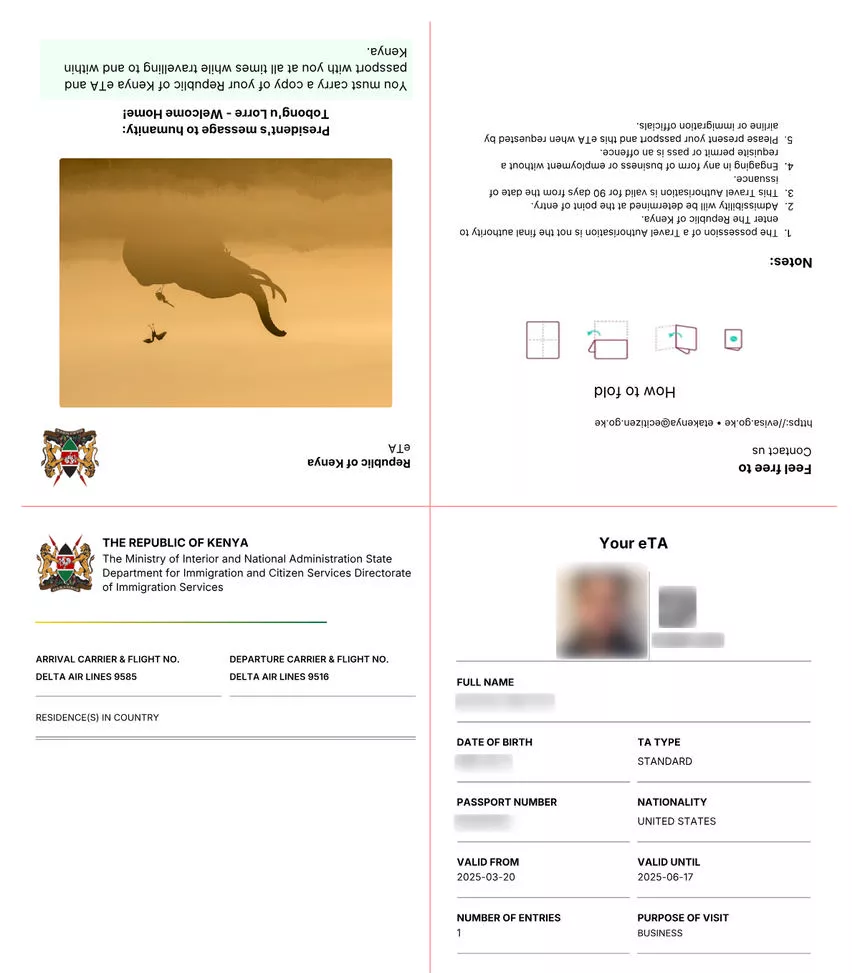
There is no physical visa sticker, no embassy appointment, and no queue at the airport. You submit everything digitally and receive the approved eTA as a PDF via email.
This applies to tourists, business travelers, transit passengers, medical visitors, and conference attendees. The only difference is which supporting documents you upload based on your visa type.
What You Need to Apply
Prepare these items before opening the application portal. Missing documents cause the most common delays.
| Document | Details |
|---|---|
| Valid passport | At least 6 months validity from arrival date, one blank page |
| Passport scan | Clear photo of the bio-data page (JPEG, under 293KB) |
| Selfie photo | Passport-style, plain background |
| Flight booking | Confirmation with airline and flight numbers |
| Accommodation proof | Hotel reservation or host invitation letter |
| Payment card | Visa, Mastercard, Apple Pay, or Google Pay |
| Email address | Active inbox you check regularly |
| Phone number | For SMS verification |
Business travelers also need an invitation letter from a Kenyan company. Medical visitors need a hospital referral letter. Conference attendees need a participation letter. For the full document list by purpose, see our Kenya eTA requirements page.
When to Apply
Submit your application at least 2 weeks before departure. You can apply up to 90 days in advance. Standard processing takes up to 72 hours, but peak seasons (December, July-August) can add delays.
If your trip is within 7 days and you do not yet have an eTA, an expedited option is available at a higher fee. Check the current Kenya eTA fees for pricing details.
Do not book non-refundable flights or hotels until you receive your approved eTA – even though approval rates are high, rejections do happen.
Step-by-Step: How to Apply for a Kenya Visa Online
1. Go to etakenya.go.ke
Open etakenya.go.ke in a desktop browser. Click Apply Now on the homepage. This is the only official portal – third-party sites charge extra service fees and are not endorsed by the Kenyan government.
2. Accept Terms and Consent
Read the “How to Apply” disclosure and click Continue. On the next screen, read the Declaration of Consent, check the agreement box, and click Continue. You can skip any optional offers or giveaways.
3. Select Your Country of Residence
Choose the country where you currently live from the dropdown list. Frequently selected countries appear at the top for convenience. Click Continue.
4. Choose Individual or Group Application
Individual: Select this if you are applying for yourself only.
Group: Use this for families or travel groups – you can submit for yourself and up to 8 additional travelers (9 total) in one session. Each person still needs their own passport and documents.
5. Upload Your Passport Bio Page
Take a clear, flat photo of your passport’s information page. The system uses OCR to automatically extract your:
- Full name
- Passport number
- Date of birth
- Nationality
- Passport expiry date
Check the scanned data against your passport. If the scan fails, retake the photo in better lighting with the passport lying flat on a dark surface.
6. Take or Upload a Selfie
Upload a passport-style photo of yourself against a plain, light-colored background. The system cross-references this selfie with your passport photo for identity verification.
Tip: If the system rejects your selfie, try matching the angle and lighting of your passport photo more closely. Do not click “Use this photo” unless the system confirms the match.
7. Enter Contact Details
Fill in your phone number, email, residential address, occupation, and an emergency contact. All fields are mandatory. The Continue button only activates when every field has valid information.
8. Add Travel Information
Select your primary purpose of visit (Tourism, Business, Medical, etc.) and enter:
- Arrival airport: Jomo Kenyatta International (Nairobi) or Moi International (Mombasa) are the most common
- Airline and flight number: Search by carrier name, then select from the dropdown
- Accommodation addresses: Enter each hotel or host address; use “Add Another” for multiple stops
If your flight is not listed, click “Can’t find your airline or flight number?” to type the details manually.
9. Answer Background Questions
You will answer questions about:
- Country of birth and nationality at birth
- Marital status
- Whether you have visited Kenya before
- Criminal conviction history
- Whether a third party is financing your trip
- Whether you are carrying more than $10,000 USD in cash
Answer honestly – false declarations can result in eTA denial or entry refusal.
10. Upload Supporting Documents
Upload your flight booking confirmation and accommodation proof. Each file must be in JPEG format and under 293KB. If a file exceeds the limit, compress it using an online image compressor before uploading.
11. Review and Confirm
The system shows a full summary of your application. Review every field carefully – errors in passport number, dates, or names are the top reasons for rejection. Check the confirmation box and click Continue.
12. Pay the Processing Fee
Select your processing speed:
- Standard: Up to 72 hours – approximately $34.09 total ($32.50 fee + $1.59 bank charge)
- Expedited: Faster processing for time-sensitive applications (higher fee applies)
Enter your payment details and approve the transaction. Apple Pay and Google Pay are supported alongside Visa and Mastercard.
13. Save Your Reference Number
After successful payment, a confirmation page displays your application reference number and a status-check link. Copy and save this link immediately. You will also receive a confirmation email from [email protected] with your reference number and receipt.
Kenya eTA Fees Breakdown
| eTA Type | Cost | Processing Time | Validity |
|---|---|---|---|
| Standard Single Entry | $30 | Up to 72 hours | 3 months, single entry |
| Transit | $20 | Up to 72 hours | 72 hours |
| 1-Year Multiple Entry | ~$100 | Up to 72 hours | 1 year, multiple entries |
| 5-Year Multiple Entry | ~$160 | Up to 72 hours | 5 years, multiple entries |
| Expedited | Varies | Faster | Same as selected type |
All fees are in USD. A small bank processing surcharge applies on top of the listed eTA fee. The complete fee breakdown covers nationalities with different pricing tiers.
After You Submit: What Happens Next
Standard applications are processed within 1 to 3 working days. You can track your application status at any time using the reference link saved during submission.
Once approved, you receive your eTA as a PDF attachment by email. Download it, save it on your phone, and print a hard copy. Immigration officers verify the eTA at two points:
- Before boarding – your airline checks the eTA at the departure airport
- Upon arrival – Kenyan immigration verifies it at passport control
Check your Kenya eTA status if you have not received a response within the expected processing window. For timing details, see our processing time guide.
Common Mistakes That Cause Rejection
- Wrong passport number: Double-check that the OCR-scanned number matches your passport exactly
- Blurry passport scan: The auto-scan fails on low-quality photos – use a flat surface and good lighting
- Selfie mismatch: Your selfie must reasonably resemble your passport photo; wear the same glasses if your passport photo shows them
- Wrong travel purpose: Tourism covers safaris, beaches, and sightseeing only; business meetings require the Business category
- Applying too late: Apply at least 14 days before departure; last-minute applications risk missing your flight
- Using unofficial sites: Only etakenya.go.ke is the official portal; third-party “visa services” charge unnecessary extra fees
- Not saving the reference number: Without it, tracking your application becomes much harder
Tips for a Smooth Application
- Use a laptop or desktop computer for the best experience with form filling and file uploads
- Prepare all JPEG files in advance, each under 293KB
- Ensure your passport has at least 6 months of validity from your arrival date
- Double-check flight numbers and dates before submitting – corrections require reapplying
- Apply during Kenya business hours (East Africa Time, GMT+3) for potentially faster processing
- Keep your reference link saved in multiple places – email, phone notes, and a screenshot
Who Does NOT Need a Kenya eTA?
Several categories of travelers are exempt from the eTA requirement:
- Citizens of East African Partner States (Burundi, DRC, Rwanda, South Sudan, Tanzania, Uganda) for stays up to 180 days
- Citizens of select countries such as South Africa, The Bahamas, and Trinidad and Tobago for stays up to 90 days
- Holders of Kenyan permanent residence or valid work permits
- Transit passengers who do not leave the airport
- Diplomatic and service passport holders from specific countries
- UN and African Union laissez-passer holders on official business
Do You Need an eTA for Transit?
If you are connecting through Kenya on the same ticket and staying inside the airport, you do not need an eTA. However, if you plan to leave the transit area or your layover involves changing terminals outside the secure zone, you must apply for a Kenya transit eTA.
FAQs About Applying for a Kenya Visa Online
Is the Kenya eTA the same as a visa?
No. Since January 2024, Kenya replaced traditional visas with the Electronic Travel Authorization system. The eTA serves a similar function but is obtained entirely online. See our guide on eTA vs visa differences for details.
Can I apply for a Kenya visa online from any country?
Yes, the eTA application is available worldwide through etakenya.go.ke. You need a stable internet connection, a passport, and a payment method accepted by the portal.
How long does it take to get approved?
Standard processing takes up to 72 hours (3 working days). Most applicants receive approval within 24 to 48 hours. Peak travel seasons may cause longer waits. See our processing time guide for current estimates.
What if my Kenya eTA application is denied?
You receive an email notification with the reason for denial. You can reapply with corrected information or contact support at [email protected] for clarification. Common denial reasons include document errors, invalid passport scans, and mismatched information.
Can I apply for a Kenya eTA on my phone?
Yes, the portal works on mobile devices. However, a laptop or desktop is strongly recommended for easier photo uploads, document scanning, and form navigation.
Do children and infants need their own eTA?
Yes. Every traveler, including newborns, must have their own approved eTA. Each child requires a separate individual application or can be included in a group application.
What payment methods does the Kenya eTA portal accept?
The portal accepts Visa, Mastercard, Apple Pay, and Google Pay. All payments are processed in USD with a small bank surcharge added to the eTA fee.
Do I need to print my eTA?
Carry both a printed copy and a digital copy on your phone. Airlines verify the eTA before boarding and Kenyan immigration checks it upon arrival.
How far in advance can I apply?
You can submit your application up to 90 days before your travel date. The government recommends applying at least 2 weeks before departure.
What is the official website to apply for a Kenya visa online?
The only official portal is etakenya.go.ke, operated by the Directorate of Immigration Services of Kenya. Avoid third-party websites that add extra service charges on top of the government fee.