

The Kenya eTA login portal at etakenya.go.ke is where all travelers access their Electronic Travel Authorization applications. Whether you need to submit a new eTA, check your application status, or download your approved eTA document, you must log in to the official eCitizen platform first. This guide walks you through the login process, account creation, and troubleshooting common access issues.
How to Log In to the Kenya eTA Portal
Logging in to the Kenya eTA portal takes less than a minute. The official portal is hosted on the eCitizen platform, which manages all Kenyan government digital services including travel authorizations.
Step-by-Step Login Process
Follow these steps to access your Kenya eTA account:
- Open your web browser and go to etakenya.go.ke
- Click the “Sign In” or “Login” button in the top navigation area
- Enter the email address you used when creating your eCitizen account
- Enter your password
- Click “Sign In” to access your dashboard
- Navigate to “My Applications” to view your eTA submissions
Once logged in, you can check your eTA status, start a new application, or download an approved eTA as a PDF.
Creating a New eCitizen Account
If this is your first time applying for a Kenya eTA, you need to create an eCitizen account before logging in:
- Go to etakenya.go.ke
- Click “Apply Now” on the homepage
- Select “Sign Up” or “Create Account”
- Enter your email address and create a strong password
- Verify your email address through the confirmation link sent to your inbox
- Complete your profile with your full name, nationality, and passport number
- Log in with your new credentials
Your eCitizen account is permanent – you can use the same login for future eTA applications, status checks, and other Kenyan government services.
What You Can Do After Logging In
The Kenya eTA dashboard gives you full control over your travel authorization. After logging in, the portal provides several key functions:
Start a New eTA Application
From your dashboard, click “New Application” to begin the eTA process. You will need your passport details, travel itinerary, accommodation information, and a recent passport-style photo. The application process typically takes 15-20 minutes to complete.
Check Application Status
Your dashboard displays all submitted applications with their current status. Kenya eTA applications show one of these statuses:
| Status | Meaning | Action Required |
|---|---|---|
| Submitted | Application received and payment confirmed | None – wait for processing |
| Under Review | Immigration officer is reviewing your documents | None – typically 1-3 business days |
| Approved | eTA granted | Download your eTA PDF |
| Rejected | Application denied | Review reasons and reapply |
| Additional Info Required | Officer needs more documents | Upload requested documents |
Processing typically takes 2-3 business days. Learn more about Kenya eTA processing times and what affects the timeline.
Download Your Approved eTA
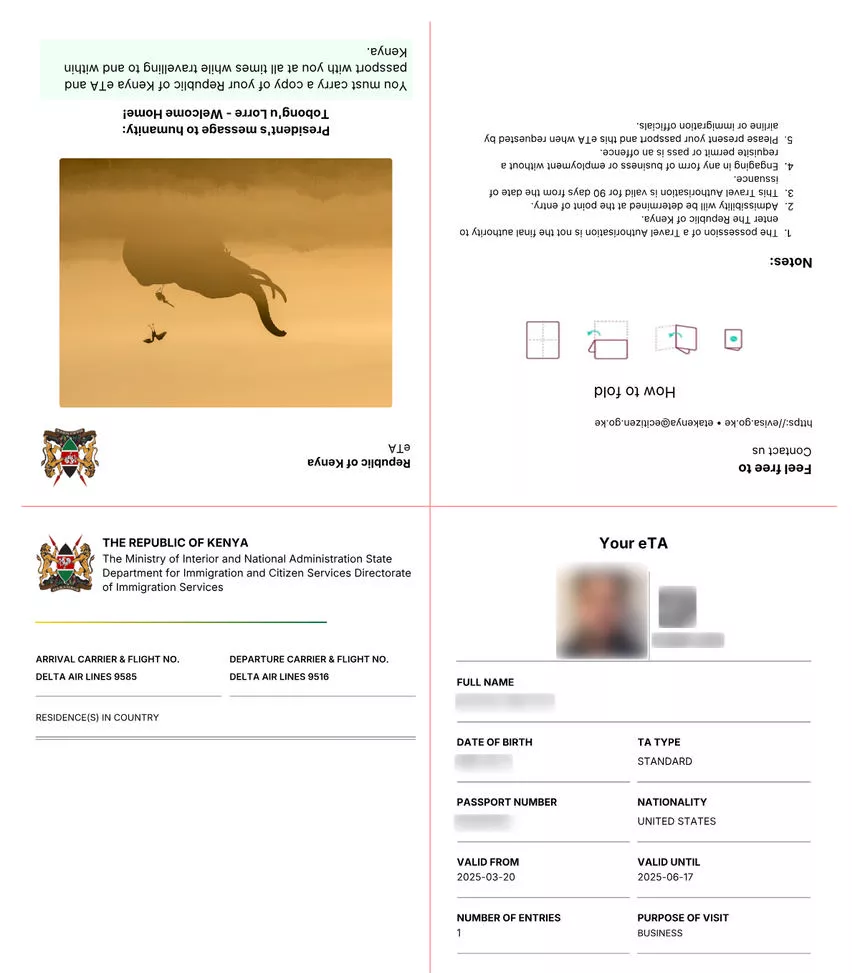
Once approved, your eTA document appears in your dashboard as a downloadable PDF. Print this document or save it on your phone – airlines and immigration officers at Kenyan ports of entry will ask to see it. The eTA is linked to your passport electronically, but carrying a printed copy is strongly recommended.
Apply for Multiple Travelers
Families and groups can manage multiple eTA applications from a single eCitizen account. Each traveler (including children and infants) needs a separate eTA, but one adult can submit applications for everyone in their travel party.
Kenya eTA Login Troubleshooting
Login problems are usually easy to fix. Here are the most common issues travelers face when trying to access the Kenya eTA portal and how to resolve them:
Forgot Your Password
If you cannot remember your password:
- Go to the etakenya.go.ke login page
- Click “Forgot Password” below the login form
- Enter the email address associated with your account
- Check your email for a password reset link (check spam/junk folders)
- Click the link and create a new password
- Log in with your new credentials
The reset link typically arrives within 2-3 minutes. If you do not receive it after 15 minutes, try requesting again or contact support.
Email Not Recognized
If the portal says your email is not recognized, you may have:
- Used a different email address when creating your account – try any other email addresses you commonly use
- Created your account through a third-party travel agent who used their own email
- Typo in your email address – double-check spelling
Portal Not Loading
The Kenya eTA portal occasionally experiences high traffic, especially during peak travel seasons (June-September and December-January). If the site is slow or unresponsive:
- Try again during off-peak hours (early morning or late evening East Africa Time)
- Clear your browser cache and cookies
- Try a different browser or device
- Disable any VPN connections, as some may be blocked
Application Not Showing After Login
If you logged in successfully but cannot find your application:
- Check that you are using the same eCitizen account you applied with
- If a travel agent applied on your behalf, the application is under their account – contact them directly
- Look for email confirmations from etakenya.go.ke to verify which account was used
Kenya eTA Login on Mobile Devices
The Kenya eTA portal works on smartphones and tablets. The etakenya.go.ke website is mobile-responsive, so you can log in, apply, and check status from any device with an internet connection. There is no dedicated mobile app – all access is through the web browser.
For the best mobile experience:
- Use Chrome or Safari as your browser
- Ensure a stable internet connection before starting an application
- Have your passport and documents ready to photograph or scan
- Save your login credentials in your browser’s password manager for quick access
Security Tips for Your eCitizen Account
Protect your Kenya eTA account with these best practices:
- Use a strong, unique password that you do not reuse on other sites
- Never share your login credentials with anyone, including travel agents
- Log out after each session, especially on shared or public devices
- Watch for phishing emails – the official portal only sends emails from @ecitizen.go.ke and @etakenya.go.ke domains
- Do not click login links in unsolicited emails – always type the URL directly
Contact Support
If you cannot resolve your login issue, contact the Kenya eTA support team:
- Email: [email protected]
- Phone: +254 110 922 064 or +254 717 436 070
- Portal: Use the contact form on etakenya.go.ke
Support is available during Kenyan business hours (Monday-Friday, 8 AM – 5 PM East Africa Time).
FAQs About Kenya eTA Login
What is the official Kenya eTA login website?
The official Kenya eTA login portal is etakenya.go.ke. This is the only legitimate website for Kenya Electronic Travel Authorization. Avoid any other websites claiming to offer eTA login services.
Can I use my old eVisa login for the new eTA system?
No. Kenya replaced the old eVisa system with the eTA on January 1, 2024. If you had an old eVisa account, you need to create a new eCitizen account on etakenya.go.ke. The old eVisa portal credentials do not carry over to the new system.
Do I need to log in to check my Kenya eTA status?
Yes. You must log in to your eCitizen account to check your application status through the portal. Alternatively, the system sends email notifications when your status changes, so check your inbox for updates from etakenya.go.ke.
Can a travel agent log in to check my eTA on my behalf?
If a travel agent submitted your eTA application, they used their own eCitizen account. You would need to contact the agent directly for status updates. For future applications, consider creating your own eCitizen account so you have direct access.
Is the Kenya eTA login free?
Creating an eCitizen account and logging in is completely free. You only pay when you submit an eTA application – the standard fee is $30 USD for a single-entry eTA. Learn more about Kenya eTA fees.
Why does the Kenya eTA portal keep logging me out?
The eCitizen platform has a session timeout for security reasons. If you are inactive for more than 15-20 minutes, the system logs you out automatically. Save your progress frequently when filling out applications, and log back in if you see a session expired message.
Can I log in to the Kenya eTA portal from any country?
Yes. The etakenya.go.ke portal is accessible worldwide. You can log in, apply, and check your status from any country with an internet connection. Some countries with strict internet restrictions may require a VPN, but avoid VPNs when possible as they can sometimes cause access issues.
What browsers work with the Kenya eTA login?
The portal works with all major browsers including Google Chrome, Mozilla Firefox, Safari, and Microsoft Edge. For the best experience, use an updated version of Chrome or Safari. Internet Explorer is not supported.